TikTok Picture Ideas That Still Look Sharp in a Circle Crop
.svg)

The fastest way to make a TikTok profile picture look “cheap” is to treat it like a normal photo.
On TikTok, your image is almost always seen small, circular, and surrounded by UI elements (plus it often sits next to your username, bio, and a few pinned videos that form your first impression). That means sharpness is less about megapixels and more about composition that survives a circle crop.
Below are TikTok picture ideas that hold up in a circle, plus the design rules that keep them looking crisp on mobile.
What the circle crop really does to your image
A circle crop removes the corners of a square image. That sounds obvious, but the practical impact is huge:
- A perfectly framed rectangular headshot can become off-balance when the shoulders or hair get clipped.
- A logo that looks centered in a square can feel “pinched” once corners disappear.
- Small text and thin lines often blur when scaled down to icon size.
If you plan your TikTok picture for the circle from the start, you can keep facial features, logos, and key shapes readable at a glance.
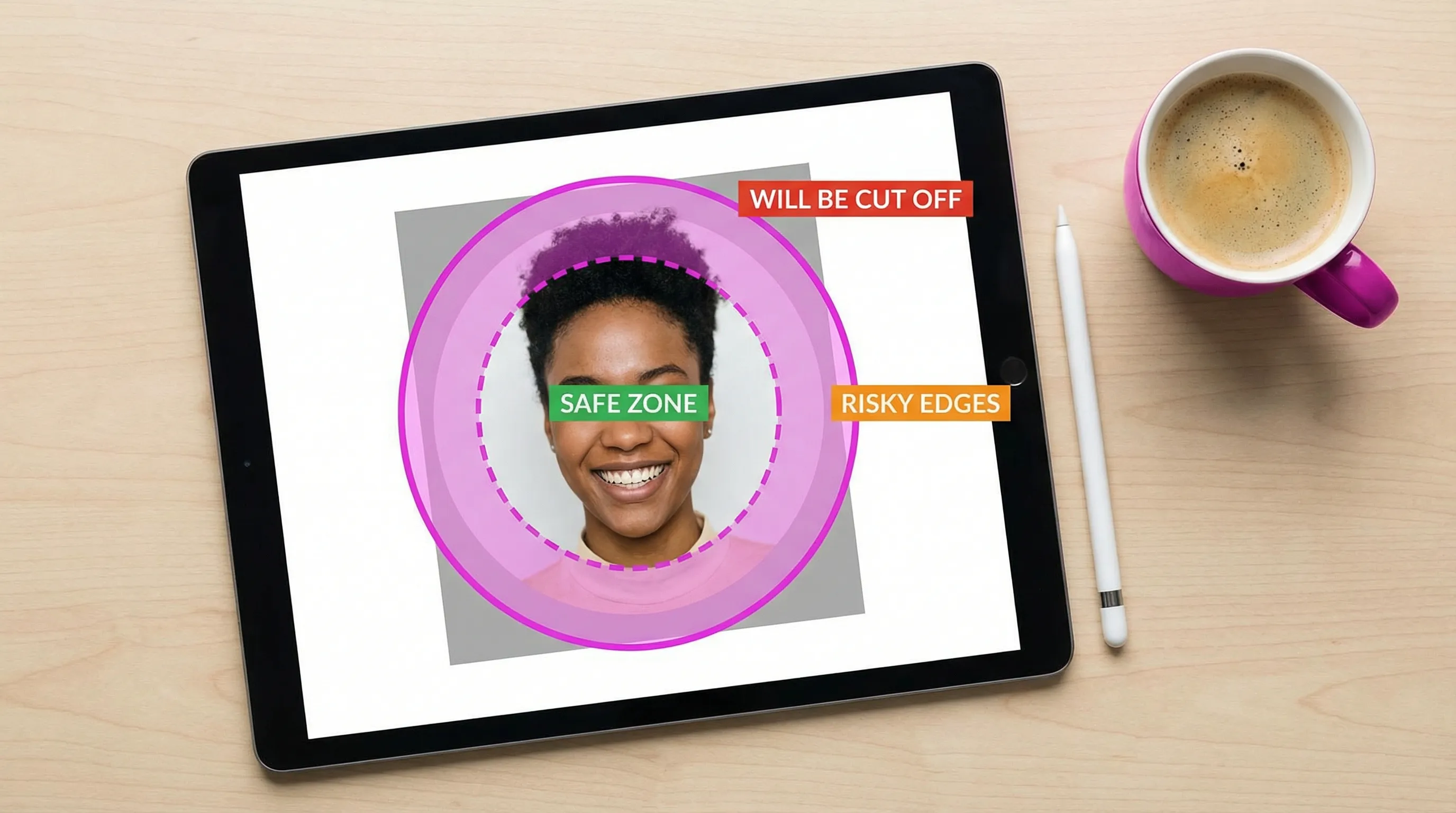
The circle-crop rules that make any TikTok picture look sharper
Before the ideas, lock in these fundamentals. They are the difference between “high quality” and “high quality that still looks good as an icon.”
Use a safe zone (and make it bigger than you think)
Design for an inner circle where the important content lives.
A practical rule: keep key details inside about 70 to 80 percent of the image width. That way, even if TikTok (or a device) slightly changes how it renders the circle, your subject stays intact.
Build contrast on purpose
Sharpness is perceived, not just measured.
If your face, product, or logo is close in color to the background, the circle crop will make it worse because there is less context around it.
Aim for:
- Dark subject on light background (or the reverse)
- Clear separation between foreground and background
- One dominant color, one supporting color
Simplify detail so it reads at thumbnail size
Even a great camera shot can turn mushy when reduced.
For TikTok profile photos, thin patterns, busy environments, and tiny typography are common reasons the image looks blurry.
Prefer:
- Solid or softly textured backgrounds
- One main subject
- Minimal accessories that do not compete for attention
Sharpen last, after resizing
If you edit in Photoshop, Canva, or another tool, do not apply sharpening early and call it done.
Resize to your final export first, then apply a light, final sharpening step. Over-sharpening creates halos around edges, which looks especially rough inside a circle.
Plan for dark mode and “black UI” environments
TikTok’s interface often makes your profile photo sit on darker backgrounds. If your image has a dark edge vignette, black clothing, or a dark background, the circular avatar can visually disappear.
A simple fix is to use a slightly lighter background or add separation (for example, a subtle outline around a logo or subject).
TikTok picture ideas that look great in a circle crop
These ideas are built for creators, freelancers, marketers, and brands who care about a clean, recognizable aesthetic.
1) The “close-up, eyes-to-camera” creator headshot
This is the highest-performing style for recognizability because faces are what people notice first.
Make it circle-proof by:
- Cropping from mid-chest to just above the head
- Keeping your eyes near the top third of the frame
- Avoiding wide-angle selfies (they distort facial proportions)
If you want to look more “premium” fast, use soft window light and a neutral background, then increase contrast slightly so your face pops.
2) The bold-color background headshot
A saturated single-color background (brand color or a color that complements your skin tone) reads incredibly well at small sizes.
This works especially well if your content is fast-paced or you post often, because your avatar becomes a consistent visual anchor.
Good color choices for clarity:
- Bright warm tones (coral, orange, warm yellow) with dark clothing
- Cool tones (teal, cobalt, purple) with light clothing
3) The “three-quarter angle” portrait with negative space
A straight-on face is classic, but a three-quarter angle can look more dynamic.
The key is to keep enough negative space so the circle crop does not flatten the composition.
Try:
- Face slightly off-center
- Background clean
- Shoulders angled, chin slightly forward
This style is popular for personal brands that want to feel editorial, not corporate.
4) The high-contrast silhouette (surprisingly effective)
A silhouette is one of the cleanest ways to stay sharp in a circle.
This is ideal if you:
- Want privacy (no full face)
- Run a themed page (music, art, gaming)
- Have a distinct outline (hat, hairstyle, microphone, instrument)
Make it work by choosing a background that is clearly different from the silhouette color, and keeping the silhouette large enough to read.
5) The “icon + border ring” logo treatment for brands
If you use a logo, TikTok’s circle crop can cut off corners, thin strokes, or small text.
A circle-ready logo avatar usually needs two tweaks:
- Use the icon mark only (not the full lockup with tagline)
- Add a subtle border ring (a few pixels) so the logo separates from any background
This is one of the most reliable TikTok picture styles for agencies, SaaS tools, ecommerce brands, and newsletters.
6) The monogram (for freelancers and consultants)
A monogram is a smart middle ground if you do not want your face as the main identifier, but you still want a polished personal brand.
What makes a monogram look sharp in a circle:
- A heavy-ish font weight (thin serif lines can blur)
- One or two letters max
- Strong contrast
- Generous spacing around the letters
If your name is long, a monogram will outperform tiny text in almost every scenario.
7) The “micro-product shot” (for product-led TikTok accounts)
If your product is visually distinct, a close-up product shot can be extremely memorable.
Examples that survive the circle crop:
- A single hero product on a clean background
- A close-up texture (packaging material, label detail, a recognizable shape)
- A product in-hand shot with shallow depth of field (background blurred)
Avoid wide scenes like “product on a desk with laptop, coffee, notebook,” because the circle crop will turn it into clutter.
8) The niche prop that signals your category instantly
Some creators win by being instantly categorized.
A single prop can communicate “what you do” without text:
- Photographer: camera near face
- Fitness coach: clean gym background, simple pose
- Chef: one signature tool or ingredient
- Designer: bold color backdrop and a stylized portrait
The prop must be large enough to read in the circle. If it becomes a tiny shape, it just adds noise.
9) The “consistent series avatar” for multi-account ecosystems
If you manage multiple accounts (brand, founder, podcast, community), create a system:
- Same background color
- Same framing
- Different accent (initial, icon, small badge)
This way each account is distinct, but the family resemblance builds trust.
This approach is also useful for teams doing enablement content. For example, if your TikTok supports sales or customer success training, pairing a clean avatar system with tools like AI roleplay training with Scenario IQ can make your brand feel cohesive across both marketing and internal learning.
Common circle-crop mistakes that make TikTok pictures look blurry or awkward
Most “bad” TikTok profile photos fail for predictable reasons:
Too much headroom
If your head is small inside the circle, your face becomes unreadable. TikTok is not LinkedIn. You need more face in the frame.
Tiny text (especially in the bottom half)
Even if the text is technically visible, it rarely looks clean at icon size. If you must include text, keep it to one letter (monogram) or a very short mark.
Busy backgrounds with hard edges
Door frames, shelves, window blinds, and crowds create tangents that look messy when cropped into a circle.
Logos with thin strokes
Thin lines break down when compressed. If your logo is delicate, consider a simplified “app icon” version for TikTok.
Over-editing and heavy filters
Excessive smoothing and aggressive HDR can make faces look plastic and can introduce compression artifacts, which reads as “low quality” even at high resolution.
A quick workflow to test if your TikTok picture will stay sharp
You do not need a complex design sprint. You need a repeatable check.
Start with a square master
Create a square canvas, place your subject, then deliberately keep the important content inside a circle-safe zone. Export in a high-quality format.
Check it at “real” size
Zoom out until the image is about the size it will appear on a phone. If it is not readable there, it will not be readable on TikTok.
Compare 2 to 3 options side by side
Circle crops can make two great photos behave very differently.
Pick variations that change one thing at a time:
- Tighter crop vs. looser crop
- Solid background vs. real background
- Face vs. monogram/logo
Preview on multiple platforms and devices
Even if this article is about TikTok, most creators reuse a profile photo across Instagram, X, and LinkedIn.
A cross-platform preview step helps you avoid fixing one circle crop while breaking another.
You can do this quickly with Social Previewing by uploading your image and checking how it renders as a profile picture across major platforms and device mockups, before you publish.
Choosing the right idea based on your goal
If you are stuck deciding, anchor the choice to what you want a stranger to do after seeing your avatar.
- If you want follows based on personality and trust, use a face-forward headshot with strong contrast.
- If you want brand recall (agency, tool, product), use an icon-only logo with a clean border ring.
- If you want a polished personal brand without a full portrait, use a monogram or a prop-based silhouette.
The best TikTok picture is the one people can recognize instantly, even when it is the size of a fingernail.
.svg)
.svg)




